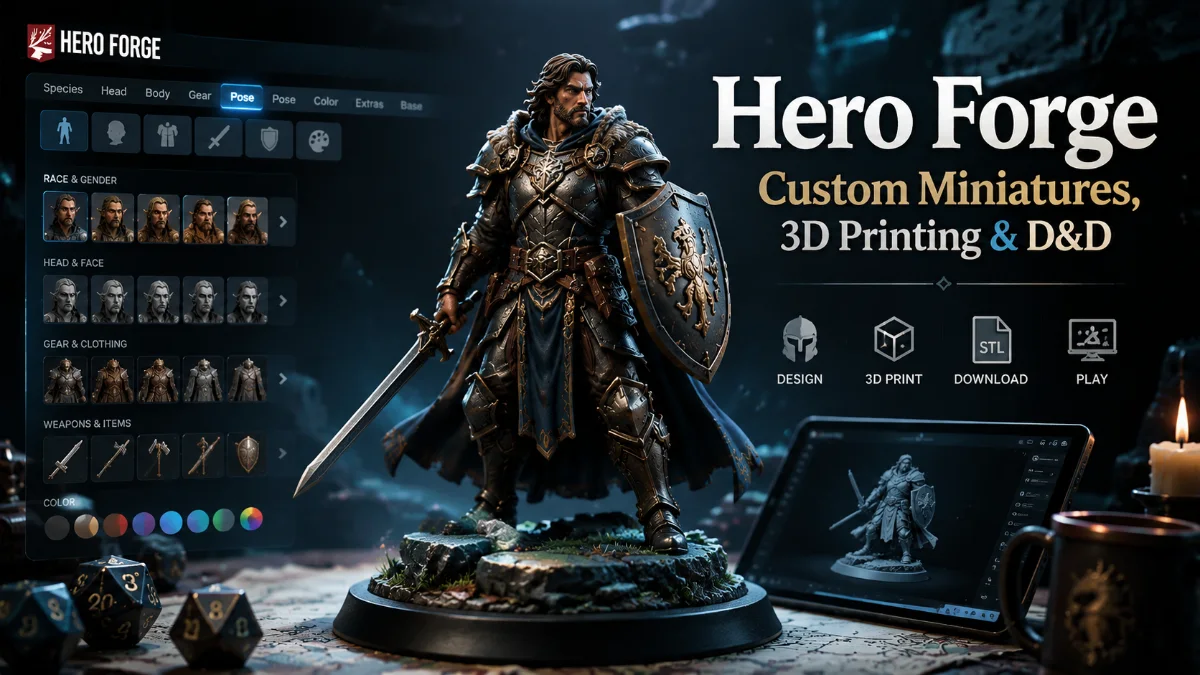

Hero Forge is an online character creator that lets tabletop gamers design a miniature around a specific character instead of settling for the closest pre-made figure they can find. You can customize physical features, clothing, armor, weapons, colors, facial details, poses, and bases, then turn the finished design into a physical miniature, an STL file for home 3D printing, or a 3D Digital miniature for supported virtual tabletops.
That flexibility is why the platform has become especially useful for D&D and other tabletop RPG campaigns. A player can translate a character sheet into a recognizable miniature, while a Dungeon Master can create distinctive NPCs, villains, allies, and encounter-specific characters.
The important part is knowing which Hero Forge product actually matches the way you play. The free character creator, physical minis, STL downloads, 3D Digital models, Pro, and Pro+ downloads are related, but they solve different problems.
What Is Hero Forge?
Hero Forge is a browser-based custom miniature design service operated by Sky Castle Studios. Its character creator allows users to build original tabletop figures by combining customizable bodies, faces, clothing, equipment, poses, colors, bases, and accessories.
The core design experience does not require a paid subscription. Hero Forge’s Basic tier currently includes full-color design tools, new weekly content, screenshot exports, and direct links to saved designs. Pro and Pro+ Downloads add more advanced creation and workflow features.
The platform is not limited to D&D. Its parts span fantasy, science-fiction, modern, historical-inspired, monstrous, anthropomorphic, and other character concepts.
That system-agnostic approach is one of its strengths, but it also explains an important limitation: Hero Forge is a visual character creator, not a D&D character-sheet importer.
You generally build the appearance you want rather than choosing an official race, class, or subclass and having the site automatically generate the appropriate miniature.
How the Hero Forge Character Creator Works
The easiest way to create a convincing miniature is to work from the character’s largest visual features toward the smallest.
Begin with body shape, proportions, species-inspired traits, face, and general silhouette. Add clothing or armor next, followed by weapons, accessories, colors, expression, pose, and base details.
The order matters because a great miniature needs to read clearly at tabletop size, not only look impressive when enlarged on a computer screen.
Start With the Character’s Silhouette
Before choosing tiny accessories, decide what somebody should understand about the character from several feet away.
A heavily armored warrior carrying a large shield should have a very different silhouette from a lightly equipped rogue, staff-bearing mage, or bow-focused ranger.
For fantasy characters, recognizable features such as horns, ears, tails, wings, armor profiles, robes, shields, staffs, bows, or oversized weapons can establish identity quickly.
This becomes especially important after the figure is printed at approximately tabletop scale, where minute visual differences are less obvious than they appear in the browser preview.
Customize the Face and Expression
Hero Forge’s Face Customizer provides detailed control over facial appearance and expressions without requiring Pro.
For recurring characters, the face can add personality that equipment alone cannot.
A suspicious rogue, exhausted veteran, confident knight, stern cleric, or wild-eyed spellcaster can feel noticeably different even when several characters use similar fantasy clothing.
Do not overestimate how much extremely fine facial detail will be visible on the finished miniature, however. Larger expression changes, hair silhouettes, horns, facial hair, and prominent scars usually communicate more effectively at tabletop distance than tiny adjustments.
Choose Equipment With a Purpose
It is tempting to add every cool accessory available, but visual clarity is usually more valuable than maximum complexity.
Ask which pieces are essential to the character’s identity.
A shield bearing the character’s visual motif may matter more than three small belt accessories. A spell focus may communicate a caster’s role better than several decorative objects. A distinctive sword may be more memorable than filling every available hand or attachment point.
The strongest designs normally have an obvious focal point.
Use Pose as Part of the Character Design
Pose can change the personality of a miniature without changing a single item.
A sword can be raised aggressively, held cautiously, rested casually, or incorporated into an elaborate action pose. A spellcaster can look disciplined, theatrical, threatening, or defensive depending on arm placement and body position.
For this reason, posing should not be treated as a last-minute finishing step. It is one of the main tools for communicating character identity.
Hero Forge Products Compared
After finishing a design, you need to decide what you actually want to receive.
| Use Case | Best-Fit Product | What You Get |
| In-person tabletop gaming | Physical miniature | Manufactured tabletop figure |
| Painting your own character | Standard or Premium Plastic | Unpainted physical mini |
| Ready-to-play color figure | Color physical option | Printed color miniature |
| Home 3D printing | STL Download | Printable STL geometry |
| Supported 3D virtual tabletop | 3D Digital | Colored and textured digital model |
| Advanced character creation | Pro | Extra design and workflow tools |
| Frequent STL/VTT downloads | Pro+ Download | Pro features plus digital credits |
One of the most important purchasing distinctions is between an STL Download and a 3D Digital miniature.
An STL is intended for 3D printing.
A 3D Digital miniature is intended for compatible virtual tabletop software and cannot be used as the printable equivalent of an STL.
Physical Hero Forge Miniatures
If you play around a physical table and do not want to manufacture the figure yourself, ordering a physical miniature is the most straightforward route.
Hero Forge currently offers multiple physical formats and materials, including Standard Plastic, Premium Plastic, color options, metal products, and other formats. Its current general product page lists physical products starting at $12.99, although the final price depends heavily on the format and miniature.
For traditional custom 3D-printed minis, Standard Plastic starts at $19.99, and Premium Plastic starts at $29.99.
Hero Forge uses a Refined XL pricing system for several physical materials. The final cost can increase according to the miniature’s overall size, volume, and complexity, so a large or elaborate character may cost more than the starting price.
Standard Plastic vs. Premium Plastic
Standard Plastic is the more budget-oriented choice for players who want to paint their own miniature. It arrives with a matte gray primer and is printed at a 50-micron layer thickness.
Premium Plastic is aimed at users who prioritize finer surface detail. Hero Forge lists it at a 35-micron print layer thickness, and the miniature arrives unpainted in a glossy black finish.
For an ordinary gaming miniature that will be painted and handled regularly, Standard Plastic can offer the better value.
For a highly detailed character where sculpt definition matters more, Premium Plastic can justify the higher starting price.
Neither option automatically makes the character design better. Clear pose, silhouette, proportions, and equipment remain more important than simply choosing the more expensive material.
Hero Forge Scale and Tabletop Compatibility
Hero Forge describes its physical miniatures as roughly 30mm scale, which is a common scale for tabletop RPG miniatures. Depending on the design and product, the company offers ½-inch, 1-inch, 1-by-2-inch, and 2-by-2-inch base options.
That makes typical player-character designs practical for grid-based tabletop RPGs such as D&D.
However, “30mm scale” should not be interpreted as a promise that every miniature from every manufacturer will have identical proportions. Sculpting style, head size, body proportions, poses, footwear, bases, and manufacturing processes can make nominally similar scales look slightly different beside one another.
For most RPG tables, that visual variation is minor compared with the advantage of having a miniature that clearly represents the intended character.
Hero Forge 3D Printing and STL Files
For users who own a 3D printer, the STL product removes the need to order a finished physical miniature.
A custom single-character STL currently costs $7.99, while a two-character STL costs $15.98. Hero Forge distributes the files as zipped STL models of approximately 5–10 MB.
These files are tessellated meshes and are not rigged animation models. Hero Forge also offers an option to separate the base when purchasing, which can simplify certain printing workflows.
What You Need to Know Before Printing
STL files contain the miniature’s printable geometry rather than the colors painted onto the character in the browser creator.
They can be used with resin or filament printing workflows, but the quality of the finished result depends significantly on the printer, settings, orientation, support strategy, resin or filament, and post-processing.
Hero Forge warns that some home printers may struggle to reproduce very fine details or thin, free-standing components visible in the high-resolution creator preview.
That is a useful design lesson in itself: if you know you will print a character at home, avoid making fragile-looking thin elements the only structural connection between important parts.
Hero Forge also provides sample STL models, allowing users to test their setup before purchasing a custom file.
Hero Forge for D&D Characters
Hero Forge works particularly well for D&D when you approach it as a translation tool.
Start with the visual information on your character sheet rather than looking for an exact menu option for every official race, subclass, background, or feature.
For example, identify the character’s:
- overall build and ancestry-inspired physical traits;
- armor or clothing style;
- primary weapon, shield, focus, or spellcasting item;
- most recognizable accessories;
- facial expression and personality;
- pose;
- color palette;
- base or environmental theme.
A fighter can be communicated through stance, armor, weapon, and shield choices. A wizard might rely more heavily on robes, a staff, spell effects, books, or an arcane pose. A rogue may read better through a light silhouette, knives, hooded clothing, or a cautious stance.
The objective is not to recreate a character sheet literally. It is to communicate the same character visually.
Designing Characters for Long Campaigns
A level-one character’s appearance does not need to become permanent.
Campaign characters frequently gain new weapons, armor, scars, magical items, titles, companions, or visual motifs as their story develops.
Keeping the design saved gives you the option to update it later rather than rebuilding the character concept from scratch.
That can be particularly satisfying in long-running campaigns where the miniature becomes a visual record of character progression.
Hero Forge for Dungeon Masters
Players are the obvious audience for custom character miniatures, but Dungeon Masters and other Game Masters may get even more use from the system.
Recurring NPCs, villains, rivals, unusual humanoid enemies, bosses, and memorable allies benefit from having a visual identity that differs from generic encounter miniatures.
You do not need a custom figure for every background NPC.
The highest-value candidates are characters who appear repeatedly, matter to the plot, or need to be instantly recognizable when placed on the table.
For a GM creating many designs, features such as folders, Kitbashing, saved paints, pose imports, and other Pro tools also become more useful than they are for someone building only one character.
Using Hero Forge With Virtual Tabletops
Online players should generally look at the 3D Digital product rather than the printable STL.
A custom 3D Digital miniature currently costs $7.99 for one character or $15.98 for a two-character design. It preserves the character’s color, effects, and pose for use in compatible virtual tabletop applications.
Hero Forge’s Access Key system connects your account to supported platforms. Once connected, purchased 3D Digital miniatures that have finished processing can automatically become available in the connected VTT.
Which Virtual Tabletops Are Supported?
Hero Forge’s current official product documentation lists TaleSpire, Harpy, Dungeon Alchemist, MirrorScape, Battle Map Studio, Foundry VTT, Scene Grinder, RPG Stories, and Tabletop Simulator through a Unity Asset Bundle.
Compatibility can change as third-party platforms are updated, so checking the official supported-platform documentation before purchasing is better than relying on an older list from a forum, video, or review.
This is particularly important if your campaign uses a VTT that is not explicitly supported.
Hero Forge Pro: What Do You Actually Get?
You do not need Hero Forge Pro simply to create a character.
The free Basic tier already provides the core full-color design tools.
Pro is better understood as a package for users who want more advanced character construction, image creation, organization, and workflow features.
Current Pro features include Kitbashing, Decal Kitbashing, Token Maker, HD Character Portraits, Scene Maker, folders for saved characters, saved custom paints, importing colors and paint sets, importing outfits and poses, Collaborator Collection access, and beta access to selected content and features.
At the time of writing, Pro costs $5.99 per month on a one-month plan, $4.99 per month when purchasing three months, or $3.99 per month on a 12-month subscription.
Pricing and features can change, so current checkout terms should always take priority over older published figures.
What Is Pro+ Download?
Pro+ Download includes the Pro feature set and adds benefits intended primarily for users who regularly purchase digital miniatures.
Subscribers currently receive five digital credits per month. Each credit can be redeemed for an STL or 3D Digital miniature, and credits can accumulate up to a maximum of 120. Subscribers also receive a featured pre-made digital pack each month.
The current listed Pro+ Download pricing is $19.99 per month for a one-month term, $16.99 per month on a three-month term, or $14.99 per month when purchasing 12 months.
For someone purchasing one miniature occasionally, Pro+ may offer little advantage.
For a frequent 3D printer, digital Game Master, or VTT player regularly creating characters, five monthly digital credits can change that calculation significantly.
Kitbashing: Where Pro Becomes More Powerful
Kitbashing is one of the clearest differences between the free creator and the paid Pro experience.
Hero Forge describes Kitbashing as a system that allows users to place items more freely and manipulate them using scaling, rotation, positioning, grouping, duplication, mirroring, and expanded joint-based posing controls.
For a straightforward warrior, wizard, ranger, or similar character, the normal creator may already be sufficient.
Kitbashing becomes more valuable for unusual character concepts that cannot be expressed cleanly through standard attachment positions and poses.
That means Pro is not automatically “better” for every user. Its value rises with the complexity of the designs you want to build.
Daggerheart Collaborator Collections
Hero Forge now also supports licensed Collaborator Collections alongside its normal content releases.
Its Daggerheart collaboration introduced ancestry-specific collections such as Simiah, Ribbet, and Fungril. Hero Forge currently states that these collections are available as part of Pro and Pro+ subscriptions and can also be purchased separately by non-subscribers.
The company says these licensed collections are supplemental to its regular content schedule and that its free Treasure Tuesday releases are continuing.
For users comparing older Hero Forge guides with the current platform, this is an important change: not every specialized licensed content collection necessarily follows the same access model as the platform’s normal free character parts.
Hero Forge Licensing and Commercial Use
A custom character concept and the particular visual model generated through Hero Forge are not treated identically under the platform’s terms.
Hero Forge’s Terms of Service state that Sky Castle Studios owns the Character Designs and 3D models created through the service, while downloadable 3D models are provided for personal, noncommercial use and may not be resold or redistributed. Physical items printed from those downloaded models also may not be commercially sold under the stated license.
Hero Forge separately explains that a customer may resell the single physical miniature they purchased, but that does not grant the right to reproduce or commercially exploit the underlying model.
For ordinary home campaigns, this is unlikely to matter.
It becomes important if you want to use Hero Forge-generated artwork or models in commercial books, games, merchandise, paid media, or other monetized projects. In those cases, consult the current licensing terms and applicable permission process instead of assuming that designing the miniature grants unrestricted commercial rights.
Read more: Hero Forge: Complete Guide to Custom Miniatures, 3D Printing, Pro, and D&D
Is Hero Forge Worth It?
Hero Forge is most valuable when character specificity matters more than buying the cheapest possible miniature.
If you only need an anonymous guard, goblin, skeleton, or background enemy, a mass-produced miniature may be more economical.
If you want your long-running player character, major villain, favorite NPC, or unusual character concept to look recognizably different from stock figures, custom creation becomes much more compelling.
For in-person players who do not own a printer, a physical mini is the simplest choice.
For hobbyists with an established 3D-printing workflow, the $7.99 STL offers a much cheaper route to the design itself.
For users playing in compatible 3D virtual tabletops, the 3D Digital product is the relevant format.
For occasional character designers, the free Basic tools may be enough.
For users creating complex characters frequently, Pro’s Kitbashing and organizational features are substantially more useful. Pro+ Download is most attractive to people who regularly need STL or VTT models.
The best Hero Forge purchase is therefore not necessarily its most expensive product. It is the option that matches how you actually intend to use the character.
Frequently Asked Questions
Is Hero Forge free?
Yes. Hero Forge’s Basic tier is free and includes the core full-color character-design tools, weekly content, screenshot exports, and direct links to designs. Physical miniatures, STL downloads, 3D Digital models, some licensed collections, and Pro subscriptions are paid separately.
Can I use Hero Forge for D&D?
Yes. It is widely suited to creating player characters, NPCs, villains, and other tabletop figures for D&D-style campaigns. Instead of importing a D&D character sheet, you visually recreate the character through body features, clothing, armor, weapons, pose, expression, and colors.
How much does a Hero Forge miniature cost?
Pricing depends on the product and complexity. Standard Plastic currently starts at $19.99, Premium Plastic at $29.99, and Hero Forge lists some physical formats starting as low as $12.99. Certain physical materials use size-, volume-, and complexity-based pricing.
How much does a Hero Forge STL cost?
A single custom STL currently costs $7.99, while a two-character STL costs $15.98.
Can I 3D print a Hero Forge character at home?
Yes. Hero Forge sells STL files specifically for home 3D printing. The company says the files can be used with resin and filament printers, although the achievable detail depends on the printer and print settings.
What is the difference between an STL and a 3D Digital miniature?
An STL contains geometry intended for 3D printing. A 3D Digital miniature preserves the colors, effects, and posing needed for supported virtual tabletop use. Hero Forge states that its 3D Digital miniatures cannot be printed as a replacement for an STL.
Do I need Hero Forge Pro?
No. Pro is optional. The free Basic tier contains the core creator, while Pro adds tools such as Kitbashing, Decal Kitbashing, Token Maker, HD portraits, Scene Maker, folders, saved paints, importing features, and other advanced functions.
What virtual tabletops support Hero Forge?
The current official list includes TaleSpire, Harpy, Dungeon Alchemist, MirrorScape, Battle Map Studio, Foundry VTT, Scene Grinder, RPG Stories, and Tabletop Simulator through its supported Unity Asset Bundle format. Compatibility can change, so confirm the current list before buying.
What scale are Hero Forge miniatures?
Hero Forge describes its custom physical miniatures as approximately 30mm scale, with several base sizes available depending on the miniature and product.
Can I commercially use or sell Hero Forge designs?
Commercial rights are restricted. Hero Forge’s terms state that downloadable 3D models are licensed for personal, noncommercial use and cannot be resold or redistributed. Commercial projects involving generated assets should therefore be checked against the current terms and any applicable permission requirements.