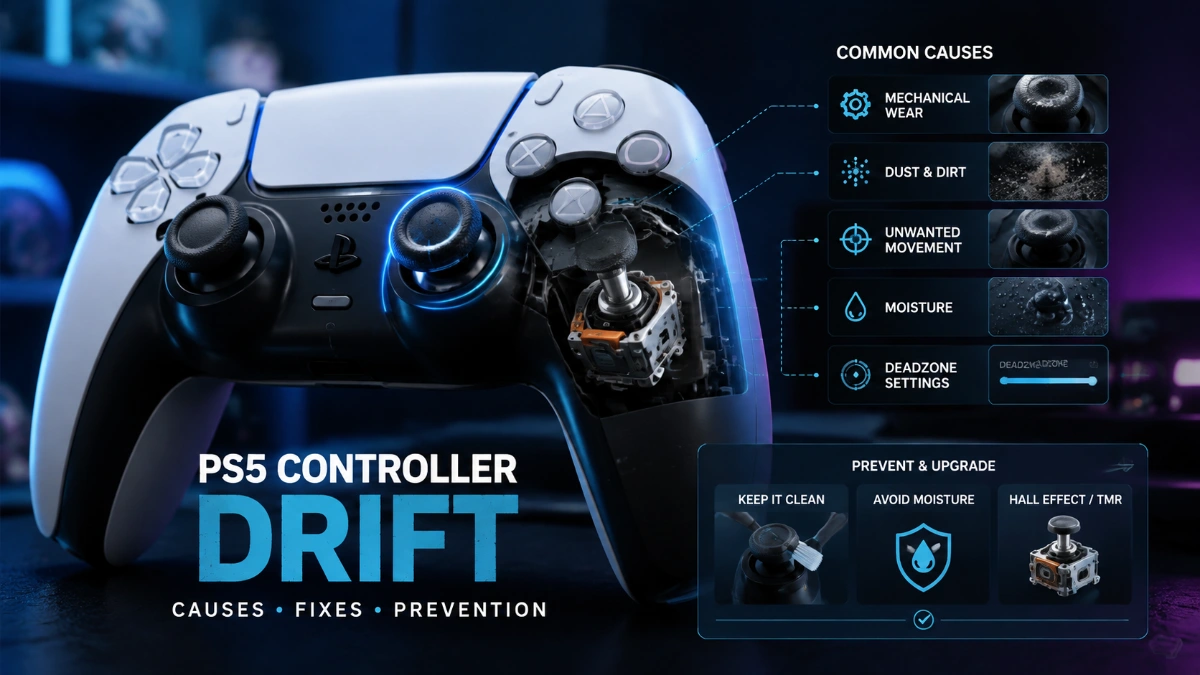

When PS5 controller drift appears, the visible symptom is simple: the game receives analog-stick movement even though your thumb is not moving the stick. The reason is more complicated.
A standard DualSense uses mechanical joystick modules with potentiometers. Those components translate physical stick movement into electrical signals, and persistent drift can occur when the joystick no longer reports the neutral position accurately. But wear is not the only possible explanation. Game settings, contamination, physical damage, moisture, and temporary controller problems can produce or influence similar symptoms.
Understanding those differences matters because a deadzone, a reset, and a joystick replacement do three completely different things.
What happens inside a DualSense joystick?
A conventional DualSense joystick module contains two potentiometers, one for each axis. iFixit’s repair documentation identifies the potentiometers as part of the joystick module and explains that persistent drift is commonly associated with a worn module.
A potentiometer works by translating mechanical movement into an electrical value. As the stick moves, an internal contact mechanism changes its position across a resistive track. The controller interprets the resulting signal as the stick’s position.
When the stick is released, the system expects a stable neutral reading.
If the hardware instead reports a small offset, a game can interpret that offset as movement.
That is the basic mechanism behind a familiar symptom:
You release the stick → the game still receives movement → the character or camera moves without intentional input.
The important point is that the player sees a software symptom even though the underlying problem may be physical.
Why persistent drift is different from a random glitch
A single strange input does not prove that a joystick is worn.
Persistent drift is more convincing when:
- the same stick repeatedly moves without being touched;
- the behavior appears across multiple games;
- resetting the controller does not resolve it;
- current software does not change the behavior;
- the problem gradually becomes more noticeable.
iFixit’s current DualSense repair documentation specifically identifies a worn joystick module as a likely explanation for persistent drift.
That is why a recurring hardware symptom deserves a different response from a one-time software glitch.
The main causes of unwanted stick input
It is tempting to assign every drifting controller to one cause. A better model is to separate the possibilities.
| Possible cause | What may point toward it | Appropriate response |
| Joystick-module wear | Persistent drift across games | Consider repair/service |
| Contamination | Intermittent or changing behavior | Conservative cleaning/inspection |
| Game settings | Problem limited to one game | Check deadzone/sensitivity |
| Temporary controller/software issue | Behavior changes after reset/update | Continue troubleshooting |
| Physical impact | Problem follows a drop or impact | Inspect/service |
| Liquid exposure | Problem follows spill or moisture | Stop assuming normal wear; seek service |
These categories can overlap. A controller can have an aging joystick and also accumulate contamination.
That is why diagnosis is more useful than a blanket statement such as “dust causes drift.”
Myth: Dust is always the real cause
Dust can be a problem for electronics, and Sony specifically advises keeping the DualSense free of excess dust, small particles, and liquid.
But that does not prove that dust is responsible for a particular drifting controller.
If a controller continues drifting after sensible maintenance and troubleshooting, the internal joystick becomes more relevant.
There is also an important distinction between routine cleaning and internal repair cleaning.
Sony’s consumer manual warns against using alcohol and other chemical cleaners on the controller.
Meanwhile, iFixit’s V1 DualSense repair procedure uses high-concentration isopropyl alcohol as part of an internal repair process after opening the controller.
Those instructions serve different purposes.
A technical repair procedure should not be turned into a general recommendation to spray alcohol into every controller.
Myth: Software is never responsible
The opposite extreme is also wrong.
Software and game settings can influence what the player experiences as drift.
A game may have an adjustable deadzone. Another may ignore tiny stick inputs differently. A temporary controller issue can also justify resetting the DualSense and updating its software.
Sony currently provides DualSense device-software updates through the PS5 and directs users toward reset and repair troubleshooting when controller problems persist.
So the correct rule is:
Do not assume software is the cause, but do not rule it out before testing.
If the problem occurs only in one game, investigate it first.
If it occurs consistently across games and survives basic troubleshooting, a hardware explanation becomes stronger.
Myth: A deadzone repairs the joystick
A deadzone changes how a game interprets small movements.
For example, suppose the physical stick produces a small unintended signal near its neutral position. A larger deadzone can tell the game to ignore that signal.
The character may stop moving.
But the joystick itself has not been repaired.
This distinction matters because a workaround can be useful while still leaving the underlying hardware problem untouched.
For casual play, a mild deadzone adjustment may be perfectly acceptable.
For competitive play, however, making the deadzone too large can reduce responsiveness to small intentional movements.
Myth: The DualSense Edge cannot drift
The DualSense Edge is more repairable, not magically immune to analog-stick wear.
Sony designed the Edge with replaceable stick modules. Its official instructions show how to release the module, remove it, and install a replacement; the left and right modules are interchangeable.
iFixit has separately documented that the Edge’s stick modules use potentiometer-based sensing.
That creates an important distinction:
Standard DualSense: more involved internal joystick repair.
DualSense Edge: replaceable stick module.
The Edge therefore addresses repairability, not complete elimination of the traditional potentiometer wear mechanism.
Myth: All controller drift behaves the same
The word “drift” describes a symptom, not a universal failure pattern.
Many controllers use potentiometer-based analog sticks, so they can share a broad wear mechanism. But controllers differ in:
- joystick module design;
- firmware;
- deadzone behavior;
- manufacturing tolerances;
- internal revisions;
- repairability;
- warranty policies.
The Nintendo Joy-Con experience should therefore not be used as a direct predictor of how long a DualSense will last.
Likewise, there is no defensible universal statement that every DualSense will drift after a particular number of hours.
What about aggressive gameplay?
Heavy use means more mechanical movement, but the exact relationship between a particular playing style and drift is not predictable enough to give users a universal timeline.
It would be misleading to say that pressing the stick hard a certain number of times will cause drift.
A better conclusion is simply that mechanical components experience wear and that unnecessary physical abuse is best avoided.
Do not:
- slam the thumbsticks;
- throw or drop the controller;
- force the stick excessively;
- leave it exposed to spills;
- continue using it normally after significant liquid exposure.
Sony’s manual warns against dropping, throwing, strong physical impact, water, steam, high humidity, and other unsuitable conditions.
Can humidity or moisture cause drift?
Moisture can damage electronic equipment, but ordinary humidity should not automatically be blamed for every drifting controller.
Sony specifically warns against water, steam, and high-humidity exposure.
A controller exposed to a spill or significant moisture is a different situation from one simply being used in a humid climate.
If a stick problem begins after liquid exposure, treat it as a potential hardware-damage event rather than assuming the joystick has simply reached its normal wear point.
The most useful prevention strategy is realistic
There is no maintenance routine that can guarantee a conventional mechanical joystick will never wear.
The sensible objective is to reduce avoidable environmental and physical stress.
Keep the controller clean and dry
Store it somewhere away from food, drinks, smoke, and unnecessary dust.
Sony’s manual provides specific care warnings and does not recommend alcohol or solvents as routine cleaning products.
Avoid physical abuse
Normal analog-stick movement is part of the controller’s intended use. You do not need to avoid ordinary full-range movement during gameplay.
What matters is avoiding unnecessary force and impact.
Do not treat “stick exercise” as proven preventive maintenance
Rotating the stick repeatedly is frequently recommended online as a way to dislodge debris.
It may change a symptom in some situations, but there is insufficient authoritative evidence to describe a fixed rotation routine as a proven way to prevent joystick wear.
That is an important distinction because preventive advice should be based on evidence rather than repetition across repair blogs.
Know when maintenance has stopped being useful
If the controller repeatedly drifts after reset, software updates, and sensible maintenance, stop treating it as a cleaning problem.
That is the point at which service or hardware repair becomes a more rational next step.
What actually counts as a permanent repair?
A repair should address the component responsible for the fault rather than merely changing how the symptom is interpreted.
For a standard DualSense, joystick-module replacement is an example of a hardware repair. iFixit’s current guides describe this as a difficult soldering procedure and identify persistent drift as a likely worn-module problem.
That is very different from changing a game’s deadzone.
There is also a compatibility issue: different DualSense revisions exist. Sony provides model-number information, and iFixit’s replacement parts are listed for specific revisions.
If you are considering a repair, identify the controller before purchasing a part.
Are Hall-effect and TMR sticks the answer?
Hall-effect and TMR technologies approach stick sensing differently from conventional potentiometers.
Instead of relying on the same physical resistive-contact mechanism, magnetic sensing can measure position without that traditional contact-wear mechanism.
That makes these technologies attractive to users who want greater resistance to conventional potentiometer wear.
But “drift-proof” is too absolute.
A joystick still contains mechanical parts, and electronic components can fail for other reasons. Calibration and manufacturing quality also matter.
A better description is:
Hall-effect and TMR designs can avoid the traditional potentiometer contact-wear mechanism.
That is a meaningful technical advantage without claiming that failure becomes impossible.
A better way to diagnose the cause
Rather than guessing, use the pattern of the symptom.
| What you observe | What it suggests | What to do |
| Only one game is affected | Game configuration may be involved | Check deadzone/sensitivity |
| Multiple games are affected | Controller problem becomes more likely | Reset and update |
| Problem disappears after reset | Temporary issue is possible | Monitor |
| Problem remains after reset/update | Hardware becomes more likely | Consider service |
| Cleaning changes the symptom briefly | Contamination may contribute | Reassess if it returns |
| Problem started after liquid exposure | Potential hardware damage | Seek appropriate service |
| Controller is covered | DIY repair may be a poor first choice | Check Sony terms |
| Persistent drift on an old controller | Wear is increasingly plausible | Compare repair/replacement |
This approach provides more useful information than declaring that every drifting stick has one identical cause.
Read more: Why PS5 Controller Drift Happens: Causes, Myths, and Prevention
What the lawsuit does not prove
Legal disputes should be kept separate from technical diagnosis.
A U.S. proposed class action was filed over alleged DualSense drift, with plaintiffs alleging that the controller had a defect and that Sony knew about it. Those are allegations made in litigation; they should not be presented as proof that every DualSense is defective or that a particular controller qualifies for compensation.
For a current repair decision, your applicable warranty and service terms matter more than an old legal headline.
Frequently Asked Questions
What causes PS5 controller drift?
Persistent drift in a standard DualSense is commonly associated with wear in the potentiometer-based joystick module. Other possible contributors include contamination, physical damage, moisture, and game-specific input settings.
Why does drift sometimes disappear after cleaning?
Cleaning may change symptoms when contamination is affecting the joystick mechanism. If the problem returns repeatedly, however, cleaning should not be treated as proof that the underlying component has been permanently restored.
Does dust automatically mean the joystick is damaged?
No. Dust can affect electronics, and Sony advises keeping the controller clean, but visible dust alone cannot establish the cause of a specific drift problem.
Can a software update repair a worn analog stick?
A software update can rule out or resolve some software-related controller problems, but it should not be described as a guaranteed repair for physical joystick wear. Sony provides controller software updates as part of its troubleshooting process.
Does the DualSense Edge use different stick technology?
The Edge’s stick modules are still potentiometer-based according to iFixit’s teardown analysis. Its major difference is that Sony designed the modules to be replaceable.
Can aggressive gameplay cause drift?
Heavy use contributes to mechanical activity, but there is no reliable universal formula for predicting drift from a particular game or playing style. Avoiding excessive force and physical abuse is sensible, but normal stick use is expected.
Are Hall-effect sticks immune to drift?
No. They avoid the traditional potentiometer contact-wear mechanism, which can make them more resistant to that particular type of failure, but they can still experience other mechanical or electronic problems.
Does TMR eliminate stick wear?
TMR changes the sensing mechanism and avoids traditional resistive-contact wear, but the complete joystick assembly still contains other components. It is better described as a different, potentially more durable sensing approach than as a guarantee against every form of drift.
How do I know if my DualSense needs a new joystick?
If the same stick consistently produces unwanted input across games after resetting and updating the controller, hardware becomes a stronger suspect. Persistent drift is a common reason for joystick-module replacement in repair documentation.
What is the best way to prevent drift?
There is no guaranteed prevention method for a conventional mechanical joystick. Keep the controller clean and dry, avoid physical abuse, follow Sony’s care instructions, and seek appropriate repair when persistent drift develops. Users who specifically want to avoid traditional potentiometer contact wear can consider reputable Hall-effect or TMR alternatives.
Final Takeaway
PS5 controller drift becomes much easier to understand when the symptom is separated from the cause.
A standard DualSense uses potentiometer-based joystick modules, so mechanical wear is an important explanation for persistent drift. But not every unwanted movement proves that the potentiometer is worn. Game settings, temporary software problems, contamination, physical impact, and moisture can also play a role.
That is why the best troubleshooting process starts with evidence.
Test the controller across games. Reset it. Update the software. Check game-specific dead zones. Keep routine cleaning conservative. If the same unwanted input remains, stop assuming that another quick fix will permanently solve it.
And if you are considering an upgrade, understand the distinction: DualSense Edge improves repairability through replaceable modules, while Hall-effect and TMR technologies address the traditional potentiometer contact-wear mechanism from a different direction.
That is a much more useful way to think about drift than simply asking which cleaning trick works.